
How to Record Behavioural Observations and Manage Behaviour Support Plans
Digital PawPrint helps breeders record behavioural observations, develop individual support plans and monitor a dog’s progress over time.
This feature keeps observations, management measures, review information and outcomes together in the dog’s records.
You can also generate a PDF report containing the Behaviour Support Plan and its monitoring history.
What is a Behaviour Support Plan?
An Individual Behaviour Support Plan (IBSP) documents a behavioural concern and explains how you intend to manage and monitor it.
For example, you might notice that a dog:
- Guards food or toys around other dogs.
- Becomes anxious around unfamiliar people.
- Displays repeated signs of stress in particular situations.
- Shows behaviour that requires changes to its environment or management.
Not every behavioural observation requires a support plan. An IBSP is particularly useful when a concern needs ongoing attention, specific management measures or regular review.
A support plan is a record of your actions and observations. It does not replace veterinary advice or assessment by an appropriately qualified behaviour professional when this is needed.
1. Record a Behavioural Observation
Start by opening the dog’s record in Digital PawPrint.
- Open My Dogs and select the relevant dog.
- Navigate to the Diary section.
- Select Add Update.
- Choose Behaviour observation as the update type.
- Select the behaviour observed and describe what happened.
- Select Continue to diary details.
- Record additional information, including the frequency, observation period, severity, possible triggers and actions taken.
- Save the update.
The observation will now appear in the dog’s diary.
Tip: Use factual descriptions wherever possible. Record what you observed, when it happened and how the dog responded, rather than relying only on general descriptions such as “aggressive” or “nervous”.

2. Create a Behaviour Support Plan
If the observation identifies an ongoing concern, you can create a Behaviour Support Plan.
Open the saved behavioural observation and select Create Behaviour Support Plan.
Complete the following fields:
| Field | What to record |
|---|---|
| Behavioural concern | The behaviour or welfare concern you want to address |
| Current behaviour (baseline) | How frequently or severely the behaviour currently occurs |
| Desired improvement | What you hope to achieve |
| Support actions | Training, management or environmental measures you intend to introduce |
| Responsible person | Who will implement and monitor the plan |
| Next review date | When you intend to assess progress |
The behavioural concern, desired improvement and next review date are required.
Select Save support plan when finished.
[Screenshot: Creating a Behaviour Support Plan]
3. Add Observations to an Existing Plan
Once a dog has an active Behaviour Support Plan, you do not need to create a new plan each time another observation is recorded.
Instead, continue using the dog’s diary.
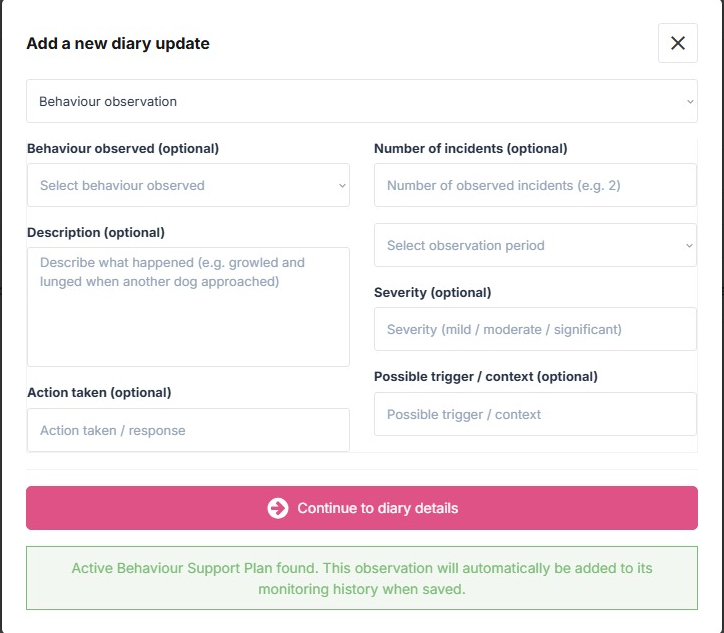
When Digital PawPrint identifies one matching active support plan, a notification explains that your new observation will automatically be associated with it.
After saving, the observation becomes part of the plan’s monitoring history.
If multiple active plans match the selected dogs, PawPrint will save the observation in the diary without automatically selecting a plan. This helps prevent observations being associated with the wrong record.
4. View and Edit a Support Plan
Open the existing Behaviour Support Plan to see its current status, goals, actions and monitoring history.
Select Edit plan if you need to update the management measures, goals, responsible person or review date.
Your previous behavioural diary observations remain separate and are not overwritten when you edit the plan.

5. Record a Professional Referral
Sometimes a concern requires assistance from a veterinary professional or suitably qualified behaviour specialist.
If professional advice is required, select Resolve plan and choose Referred for professional support as the outcome.
Enter a summary explaining why the referral is being recorded.
PawPrint records the referral in the plan’s status history, but keeps the plan Active.
This means you can continue adding behavioural observations while professional advice or further assessment is being arranged.
You can review the latest referral information from the plan overview.
6. Resolve a Behaviour Support Plan
When the concern has improved sufficiently and you consider the plan ready to close:
- Open the active Behaviour Support Plan.
- Select Resolve plan.
- Choose the appropriate outcome:
- Concern resolved.
- Improved — ongoing management needed.
- Complete the required Outcome summary, explaining what has changed.
- Add any ongoing recommendations, where relevant.
- Confirm the resolution.
The plan’s status changes to Resolved.
PawPrint records the resolution date, responsible user, outcome and summary. The status change is also added to the plan’s history.
The original behavioural observations remain available.
Important: Resolved plans no longer receive automatically linked diary observations.

7. Reopen a Resolved Plan
Behaviour can change over time. A previously resolved concern might return or require further management.
You can reopen the existing Behaviour Support Plan rather than creating a duplicate.
- Open the resolved plan.
- Select Reopen plan.
- Enter the reason for reopening.
- Confirm the reopening.
The plan changes back to Active, allowing new behavioural observations to be associated with it again.
The previous resolution details remain preserved in the status history, together with the reopening date and reason.
This allows you to see how the concern has developed over time.
8. View the Plan’s History
Digital PawPrint records important changes to the support plan, including resolutions, professional referrals and reopenings.
The status history provides a chronological record of these events, identifying the change, the date and the person responsible.
This information is separate from the monitoring history, which contains behavioural observations recorded through the diary.
Together, these records help explain both what happened to the dog and what decisions were made in response.
9. Download the Behaviour Support Plan PDF
To obtain a printable copy of a Behaviour Support Plan:
- Open the relevant plan.
- Select View IBSP Report.
- Review the report.
- Select Download PDF.
The report includes the support plan, linked behavioural observations and relevant status history. Resolved plans also display their recorded outcome.
The PDF can be retained with your records or made available when reviewing the dog’s management and welfare arrangements.
Good Record-Keeping Tips
- Record behavioural observations promptly and accurately.
- Include the circumstances and possible triggers.
- Record improvements as well as continuing concerns.
- Review support measures when the dog’s behaviour changes.
- Document referrals and professional recommendations.
- Close plans with a clear explanation of the outcome.
- Continue monitoring where ongoing management is necessary.
Maintaining these records can help demonstrate that behavioural concerns have been identified, addressed and reviewed.
Need Further Help?
If you’re unsure how to use this feature, refer to the accompanying video tutorial or contact Digital PawPrint support.
Digital PawPrint provides record-keeping and management tools. It does not replace professional veterinary or behavioural assessment.